On-screen text is checked
Prices and claims rendered into the video are verified against the store record before the video is released.
LOCXAI is a web application for local storefronts. You give it your store details and whatever photos and clips you already have; it returns finished vertical short videos you can post. There is no software to install and no video editing involved.
You enter the store once: name, address, category, opening hours, the products you want to promote and their prices, and you upload the material you have — product photos, storefront shots, interior clips, your product list.
Everything the service later writes about your store comes from this record. It is also what lets the app tell you, before you commit to anything, which video structures you can already make and which ones need one more photo.
The template gallery holds short-video structures — an opening hook, a shot rhythm, a pacing pattern — taken from formats that perform on short-video platforms. Each template shows you three things before you choose it:
You are choosing a structure, not a finished video. The content is always yours. The structures are listed, with demo videos, in the structure library; finished examples are in the showcase.
LOCXAI drafts several candidate scripts from your store record — real product names, real prices, real details. You pick one and can edit any line before continuing. Regenerating options and editing text at this stage is free; nothing is charged until you confirm.
Then you choose which languages you want. Launch languages are English, Chinese, Thai, Vietnamese and Arabic; the list in the app is authoritative. One video is produced per language, sharing the same visuals — only script, voiceover and subtitles differ.
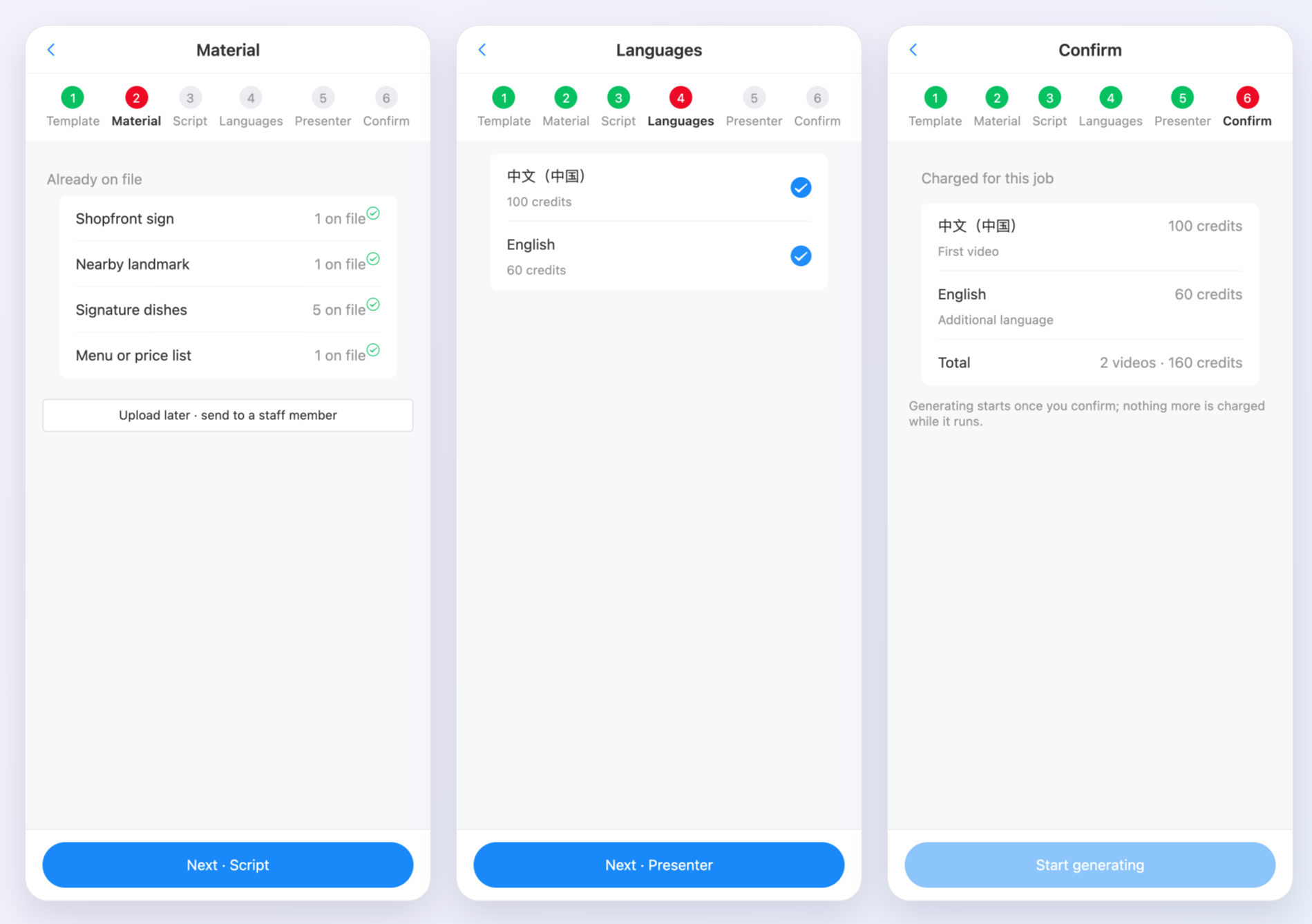
The confirmation screen shows exactly how many credits the job costs and what your balance will be afterwards. Nothing is deducted until you press confirm.
A single video is typically ready in about 15 minutes. Videos in a multi-language job finish independently, and each becomes available as it completes. You download from your account; there is no separate delivery step. If a video fails to generate, its credits return to your balance automatically.
Prices and claims rendered into the video are verified against the store record before the video is released.
Dish names, prices and proper nouns are normalised for speech and the generated audio is read back and checked, so a price is not spoken as a string of digits.
Digital presenters and voice cloning require documented consent from the person, verified before the feature is enabled. See the Acceptable Use Policy.
Internal retries are absorbed by us. If we cannot deliver, the credits go back to your balance.
Said plainly, so there are no surprises after purchase.